Thursday, May 2, 2013

Create Your Own Customized Run Command


Hello friends today i am telling about to a Pc Trick.In this Trick you can Create Your Own Customized Run Commands .This is a short cut command to open any directory or list quickly with a single code.The Run is a unique in designed application that allows you to communicate with the program through the control range.
There are several in designed orders to begin a wide range of applications like calc for Finance calculator, cmd for Control Immediate. So starting out and make our own command.


Create Your Own Customized Run Commands


We will make a Shortcut Commond of Firefox.
Follow Bellow Steps to Make Firefox Shortcut.

Step 1: Create a Shortcut of Firefox on Your Desktop.

Step 2: name it as "FX" or anythig which you want.

Step 3: Copy and paste that Shortcut into your Windows Directory.
(See Bellow Image)

 Create Your Own Customized Run Commands 


Step 4: Now Open Run Utility Box.Than type your short word,
eg-"FX"
Done!
Thanx friendzzzz...comment here 

how to make pendrive as a ram


here is a trick to use pendrive as RAM without using any software


Use Your Pen Drive As RAM Now a days, we can use our own pendrives as
RAMs just to boost up boot speed and also operational system speed.Its
not only possible for those who have vista 0S.It also works well for
Windows 2000 & Windows XP users. All you need is a pendrive of
minimum 1GB,i will recommend that of a 4GB


Follow the steps:


1)Inject your pendrive in the usb port of the computer

2)Now as usual let ur pc do its own work for detecting it

3)Now you gota act smart. .

"here goes the real thing" 


4)Right click on My Computer>Properties


5)Advanced>Performance Settings

6)Advanced>Change

7)Select the pen drive

8)Click on custom drive "Check the value of space available"

9)Enter the name in the initial and max columns You just used the space
of your pendrive as a Virtual Memory Now Restart. . . . . . . . . .
..Now check the general start up time and also speed up your system so
that you can have a high speed system at low cost Enjoy!

Trick to connect to internet via mobile Bluetooth without PC SUITE


Most of the times we are facing problem of internet unavailability on the go. Especially when it’s some another computer and the required PC application not installed.

Here we are going to about how to connect to internet by using mobile bluetooth . ya we can connect our mobile bluetooth to a system without using any software like PC SUITE.


1) Switch on your mobile phones Bluetooth and computer Bluetooth as well. Keep both Bluetooth radio in visible condition.

2) Now search for the Bluetooth device from your computer and then pair both.

3) Wait for the drivers to install.

4) Now go to control panel>phone and modem


5) By clicking on phone and modem option, one pop-up will open. If you opened it for first time, then one form will show on that pop-up. Just fill the form and select tone dialing option and press

OK.

6) Again open phone and modem option and now you will get modem tad on the top of that pop-up.

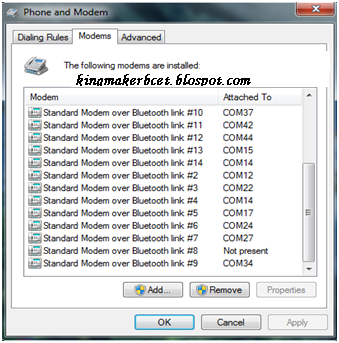
7) Go to modem tab and here you will get the list of modems installed. Now find the modem name “Standard Modem over Bluetooth Link#–”and having some com port listed for the modem. Modems showing comport “not present” please ignore.


 8) Now got the modem details. Note down the com port and the modem name.


8) Now for windows 7 go to network and shearing center and set up a new connection. For windows xp , 9) open my network place and create a new connection.

Select connect to internet. Press next

Select create a new connection. Press next

Choose dial up connection and then select the desired modem you noted down previously. Press next.

Now put dial no as *99# and keep user name and password blank. Then connect.


Hurray Its connected.


NOTE: If your phone GPRS Internet on phone is not previously activated, you may not successful to do internet. See I am not talking about wap service. The internet service should be activated.

MAKE YOU USB READ ONLY


hiii friends.....

For last 1 week i tried to make my usb device read only...


Its an easy registry change:


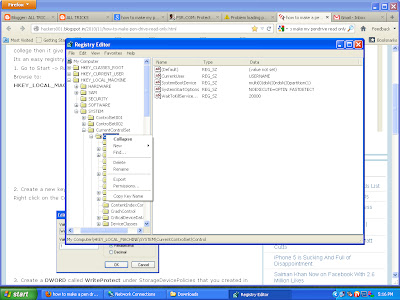
1. Go to Start -> Run -> Type regedit and hit Enter or click on the OK button.

Browse to:
HKEY_LOCAL_MACHINE\SYSTEM\CurrentControlSet\Control


 2. Create a new key called StorageDevicePolicies
Right click on the Control, select New -> Key and type in StorageDevicePolicies


3. Create a DWORD called WriteProtect under StorageDevicePolicies that you created in step 2 and set the value to 1.


This will prevent users from writing to USB drives.


4. To allow writing to USB drives just change the value to 0. Oh, you don’t need to restart your computer in order to disable write access to removable storage


ENJOY..........

Find your friends IP address


Many of us curious how to find ip address of OUR friends or any remote computer, here is the easiest way to do this :-


see how to do this..


Follow the steps to make this stuff works:


Step 1: Copy the below script in the notepad and save as
iplogger.php(you can change name whatever you like and make sure that
your file extension should be .php not .php.txt).


$file = 'IPs.txt';


$handle = fopen($file,'a');

if(!isset($_GET['p'])) { header('Location: http://google.com'); }

fwrite($handle, $_GET['p'].': '.$_SERVER['REMOTE_ADDR'].'\r\n');

fclose($handle)

?>


Step 2: Make a blank notepad file and save as ips.txt(you can change name according to your script).


Now you have two files i.e. iplogger.php and ips.txt . You have to upload this two files on the web hosting sites.


Step 3: You need to signup on a free webhosting service or any webhosting service that supports php like:


www.t35.com

www.110mb.com

www.freehostia.com

www.ripway.com etc…..


After getting your signup done, you have your own subdomain like for
instance you registered with ripway.com, then your domain is like
“http://h1.ripway.com/yourname/”


Step 4: Now Login to your ripway account and go to “My Files” in the Ripway.


Step 5: Upload this two files(iplogger.php & ips.txt) in your ripway account.


So when you’re done with the uploading part, the link to your ip logger is “http://h1.ripway.com/yourname/iplogger.php”.


Step 6: Now this is your link that you have to send to your victim. When
victim click on this link he will be redirected to the
www.google.com(you can change the this address in the script) and his
pc's current ip address save in ips.txt(make sure that chmod of ips.txt
is 777).Open ips.txt to view his ip address..


Notice:


THIS POST IS INTENDED FOR
LEARNING PURPOSES ONLY!, I WOULD NOT TAKE ANY RESPONSIBILITY FOR ANY
KIND OF ILLEGAL ACTIVITY FROM YOUR SIDE

Hack Window Xp Password Without Any software


This simple trick will help you to hack the windows password without using any software.


Step 1:Boot the computer in safe mode 


 http://cdn.instructables.com/FNH/4FT5/F4S6BRKF/FNH4FT5F4S6BRKF.LARGE.gif 


 https://blogger.googleusercontent.com/img/b/R29vZ2xl/AVvXsEjQOQ-87FSE607_rPe4fxq9u4bcO1V_PYkEo3cJUU0DKj_-bFjzzNiy6T6jfwuEXwpMwwYKiYHEQqslM6fOZ7ESh823rKOEng7S1dyP1QxjPsvC_tiFvhG8HO-CxV77n83T3Yd8_wP8Yyg/s1600/1.png


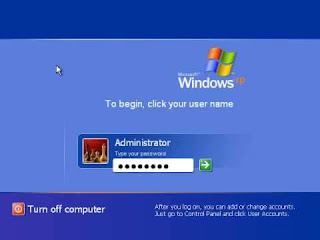
Once you enter  the main menu you will see two accounts one is the administrator account and other is your victims account login in the administrator account


step 2: Now go to Start and open  control panel 


step 3: Now select User Accounts


 step 4: Now select your victims account


step 5: Now select Remove The Password


step 6: when thats done, shut the computer down, and use the same method to set the computer back to normal mode, and when you boot it up you will have either a new password you chose, or no password at all!! 


Control your laptop or pc using another computer!! made easy for you


Remotely access file, application, software and many more of another computer using Google chrome


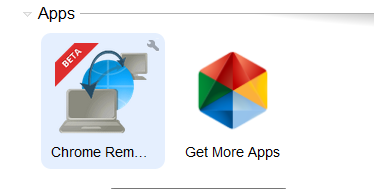
A. After your installation, Go to the start page

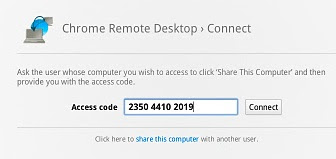
, YOU WILL SEE SOMETHING LIKE THIS.


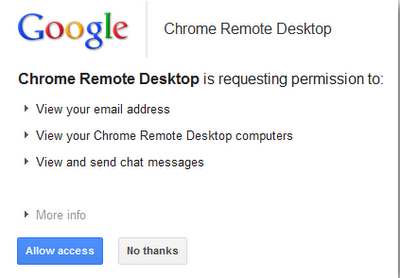
B.  Click on the Google chrome and continue


  Then proceed to the next level and allow access


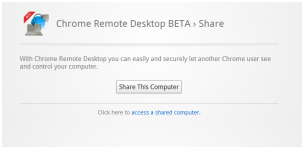
C.Share the computer


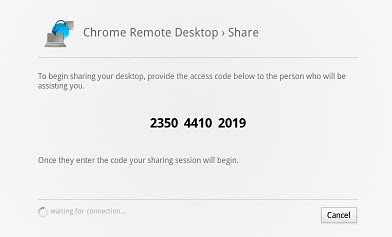
D.Copy the code and send it to the computer you want to control


E. Then your partner will connect 


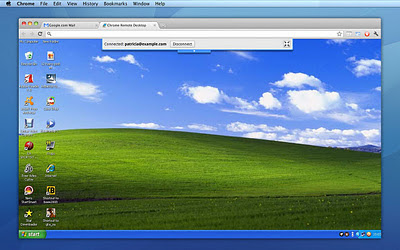
F. Once connected you would see your partners desktop like this


G.That is all then you can control the desktop as you wish


Add Cool Drop Down Menu in Blogger

Drop Down Navigation Menu For Blogger : You may have seen many drop-down menus but today "ThatsBlogging" will present you an incre...